Trustless Swap: Building the Frontend
This guide is rated as advanced.
You can expect advanced guides to take 2 hours or more of dedicated time. The length of time necessary to fully understand some of the concepts raised in this guide might increase this estimate.
In this guide, you build a frontend (UI) that allows end users to discover trades and interact with listed escrows. This is the second part of the Trustless Swap example. If you have not completed the first part, see Trustless Swap: Contracts and Indexer to set up the smart contracts and backend.
- Prerequisites
-
Complete the smart contracts and understand their design.
-
Implement the backend to learn how to index on-chain data and expose it through an API.
-
Deploy your smart contracts and started the backend indexer.
You can view the complete source code for this app example in the Sui repository.
- Sui TypeScript SDK. For basic usage on how to interact with Sui with TypeScript.
- Sui dApp Kit. To learn basic building blocks for developing an app in the Sui ecosystem with React.js.
@mysten/dapp. This is used within this project to quickly scaffold a React-based Sui app.
Overview
The UI design consists of three parts:
- A header containing the button allowing users to connect their wallet and navigate to other pages.
- A place for users to manage their owned objects to be ready for escrow trading called
Manage Objects. - A place for users to discover, create, and execute trades called
Escrows.
Scaffold a new app
The first step is to set up the client app. Run the following command to scaffold a new app from your frontend folder.
- PNPM
- Yarn
$ pnpm create @mysten/dapp --template react-client-dapp
$ yarn create @mysten/dapp --template react-client-dapp
When asked for a name for your app, provide one of your liking. The app scaffold gets created in a new directory with the name you provide. This is convenient to keep your working code separate from the example source code that might already populate this folder. The codeblocks that follow point to the code in the default example location. Be aware the path to your own code includes the app name you provide.
Setting up import aliases
First, set up import aliases to make the code more readable and maintainable. This allows you to import files using @/ instead of relative paths.
Replace the content of tsconfig.json with the following:
tsconfig.json with the following:{
"compilerOptions": {
"target": "ES2020",
"useDefineForClassFields": true,
"lib": ["ES2020", "DOM", "DOM.Iterable"],
"module": "ESNext",
"skipLibCheck": true,
/* Bundler mode */
"moduleResolution": "bundler",
"allowImportingTsExtensions": true,
"resolveJsonModule": true,
"isolatedModules": true,
"noEmit": true,
"jsx": "react-jsx",
/* Linting */
"strict": true,
"noUnusedLocals": true,
"noUnusedParameters": true,
"noFallthroughCasesInSwitch": true,
"baseUrl": ".",
"paths": {
"@/*": ["./src/*"]
}
},
"include": ["src"]
}
The paths option under compilerOptions is what defines the aliasing for TypeScript. Here, the alias @/* is mapped to the ./src/* directory, meaning that any time you use @/, TypeScript resolves it as a reference to the src folder. This setup reduces the need for lengthy relative paths when importing files in your project.
Replace the content of vite.config.ts with the following:
vite.config.ts with the following:import { defineConfig } from "vite";
import react from "@vitejs/plugin-react-swc";
// https://vitejs.dev/config/
export default defineConfig({
plugins: [react()],
resolve: {
alias: {
"@": "/src",
},
},
});
Vite also needs to be aware of the aliasing to resolve imports correctly during the build process. In the resolve.alias configuration of vite.config.ts, map the alias @ to the /src directory.
Adding Tailwind CSS
To streamline the styling process and keep the codebase clean and maintainable, this guide uses Tailwind CSS, which provides utility-first CSS classes to rapidly build custom designs. Run the following command from the base of your app project to add Tailwind CSS and its dependencies:
- PNPM
- Yarn
$ pnpm add tailwindcss@latest postcss@latest autoprefixer@latest
$ yarn add tailwindcss@latest postcss@latest autoprefixer@latest
Next, generate the Tailwind CSS configuration file by running the following:
$ npx tailwindcss init -p
Replace the content of tailwind.config.js with the following:
tailwind.config.js with the following:// eslint-disable-next-line import/no-anonymous-default-export
export default {
content: ["./index.html", "./src/**/*.{js,ts,jsx,tsx}"],
theme: {
extend: {},
},
plugins: [],
};
Add the src/styles/ directory and add base.css:
src/styles/ directory and add base.css:@tailwind base;
@tailwind components;
@tailwind utilities;
.connect-wallet-wrapper > button {
@apply !bg-transparent !shadow-none !flex-shrink-0 !py-2 !px-3 !text-sm;
}
.sui-object-card .rt-CardInner {
@apply flex flex-col justify-between;
}
Connecting your deployed package
First, deploy your package through the scripts in the api directory.
Then, create a src/constants.ts file and fill it with the following:
src/constants.ts file and fill it with the following:// You can choose a different env (e.g. using a .env file, or a predefined list)
/** @ts-ignore */
import demoContract from "../../api/demo-contract.json";
/** @ts-ignore */
import escrowContract from "../../api/escrow-contract.json";
export enum QueryKey {
Locked = "locked",
Escrow = "escrow",
GetOwnedObjects = "getOwnedObjects",
}
export const CONSTANTS = {
escrowContract: {
...escrowContract,
lockedType: `${escrowContract.packageId}::lock::Locked`,
lockedKeyType: `${escrowContract.packageId}::lock::Key`,
lockedObjectDFKey: `${escrowContract.packageId}::lock::LockedObjectKey`,
},
demoContract: {
...demoContract,
demoBearType: `${demoContract.packageId}::demo_bear::DemoBear`,
},
apiEndpoint: "http://localhost:3000/",
};
If you create an app using a project name so that your src files are in a subfolder of frontend, be sure to add another nesting level (../) to the import statements.
Add helper functions and UI components
Create a src/utils/ directory and add the following file:
src/utils/ directory and add the following file:/**
* Takes an object of { key: value } and builds a URL param string.
* e.g. { page: 1, limit: 10 } -> ?page=1&limit=10
*/
export const constructUrlSearchParams = (
object: Record<string, string>,
): string => {
const searchParams = new URLSearchParams();
for (const key in object) {
searchParams.set(key, object[key]);
}
return `?${searchParams.toString()}`;
};
/** Checks whether we have a next page */
export const getNextPageParam = (lastPage: any) => {
if ("api" in lastPage) {
return lastPage.api.cursor;
}
return lastPage.cursor;
};
Create a src/components/ directory and add the following components:
ExplorerLink.tsx
ExplorerLink.tsximport { useSuiClientContext } from "@mysten/dapp-kit";
import { formatAddress } from "@mysten/sui/utils";
import { CheckIcon, CopyIcon } from "@radix-ui/react-icons";
import { useState } from "react";
import toast from "react-hot-toast";
/**
* A re-usable component for explorer links that offers
* a copy to clipboard functionality.
*/
export function ExplorerLink({
id,
isAddress,
}: {
id: string;
isAddress?: boolean;
}) {
const [copied, setCopied] = useState(false);
const { network } = useSuiClientContext();
const link = `https://suiexplorer.com/${
isAddress ? "address" : "object"
}/${id}?network=${network}`;
const copy = () => {
navigator.clipboard.writeText(id);
setCopied(true);
setTimeout(() => {
setCopied(false);
}, 2000);
toast.success("Copied to clipboard!");
};
return (
<span className="flex items-center gap-3">
{copied ? (
<CheckIcon />
) : (
<CopyIcon
height={12}
width={12}
className="cursor-pointer"
onClick={copy}
/>
)}
<a href={link} target="_blank" rel="noreferrer">
{formatAddress(id)}
</a>
</span>
);
}
InfiniteScrollArea.tsx
InfiniteScrollArea.tsximport { Button } from "@radix-ui/themes";
import { ReactNode, useEffect, useRef } from "react";
import { Loading } from "./Loading";
/**
* An infinite scroll area that calls `loadMore()` when the user scrolls to the bottom.
* Helps build easy infinite scroll areas for paginated data.
*/
export function InfiniteScrollArea({
children,
loadMore,
loading = false,
hasNextPage,
gridClasses = "py-6 grid-cols-1 md:grid-cols-2 gap-5",
}: {
children: ReactNode | ReactNode[];
loadMore: () => void;
loading: boolean;
hasNextPage: boolean;
gridClasses?: string;
}) {
const observerTarget = useRef(null);
// implement infinite loading.
useEffect(() => {
const observer = new IntersectionObserver(
(entries) => {
if (entries[0].isIntersecting) {
loadMore();
}
},
{ threshold: 1 },
);
if (observerTarget.current) {
observer.observe(observerTarget.current);
}
return () => {
if (observerTarget.current) {
// eslint-disable-next-line react-hooks/exhaustive-deps
observer.unobserve(observerTarget.current);
}
};
}, [observerTarget, loadMore]);
if (!children || (Array.isArray(children) && children.length === 0))
return <div className="p-3">No results found.</div>;
return (
<>
<div className={`grid ${gridClasses}`}>{children}</div>
<div className="col-span-2 text-center">
{loading && <Loading />}
{hasNextPage && !loading && (
<Button
ref={observerTarget}
color="gray"
className="cursor-pointer"
onClick={loadMore}
disabled={!hasNextPage || loading}
>
Load more...
</Button>
)}
</div>
</>
);
}
Loading.tsx
Loading.tsx/**
* A loading spinner that can be re-used across the app.
*/
export function Loading() {
return (
<div role="status" className="text-center ">
<svg
aria-hidden="true"
className="w-8 h-8 text-gray-200 animate-spin fill-gray-900 mx-auto my-3"
viewBox="0 0 100 101"
fill="none"
xmlns="http://www.w3.org/2000/svg"
>
<path
d="M100 50.5908C100 78.2051 77.6142 100.591 50 100.591C22.3858 100.591 0 78.2051 0 50.5908C0 22.9766 22.3858 0.59082 50 0.59082C77.6142 0.59082 100 22.9766 100 50.5908ZM9.08144 50.5908C9.08144 73.1895 27.4013 91.5094 50 91.5094C72.5987 91.5094 90.9186 73.1895 90.9186 50.5908C90.9186 27.9921 72.5987 9.67226 50 9.67226C27.4013 9.67226 9.08144 27.9921 9.08144 50.5908Z"
fill="currentColor"
/>
<path
d="M93.9676 39.0409C96.393 38.4038 97.8624 35.9116 97.0079 33.5539C95.2932 28.8227 92.871 24.3692 89.8167 20.348C85.8452 15.1192 80.8826 10.7238 75.2124 7.41289C69.5422 4.10194 63.2754 1.94025 56.7698 1.05124C51.7666 0.367541 46.6976 0.446843 41.7345 1.27873C39.2613 1.69328 37.813 4.19778 38.4501 6.62326C39.0873 9.04874 41.5694 10.4717 44.0505 10.1071C47.8511 9.54855 51.7191 9.52689 55.5402 10.0491C60.8642 10.7766 65.9928 12.5457 70.6331 15.2552C75.2735 17.9648 79.3347 21.5619 82.5849 25.841C84.9175 28.9121 86.7997 32.2913 88.1811 35.8758C89.083 38.2158 91.5421 39.6781 93.9676 39.0409Z"
fill="currentFill"
/>
</svg>
<span className="sr-only">Loading...</span>
</div>
);
}
SuiObjectDisplay.tsx
SuiObjectDisplay.tsximport { SuiObjectData } from "@mysten/sui/client";
import { Avatar, Box, Card, Flex, Inset, Text } from "@radix-ui/themes";
import { ReactNode } from "react";
import { ExplorerLink } from "./ExplorerLink";
/**
* A Card component to view an object's Display (from on-chain data).
* It includes a label on the top right of the card that can be styled.
*
* It also allows for children to be passed in, which will be displayed
* below the object's display in a footer-like design.
*
*/
export function SuiObjectDisplay({
object,
children,
label,
labelClasses,
}: {
object?: SuiObjectData;
children?: ReactNode | ReactNode[];
label?: string;
labelClasses?: string;
}) {
const display = object?.display?.data;
return (
<Card className="!p-0 sui-object-card">
{label && (
<div className={`absolute top-0 right-0 m-2 ${labelClasses}`}>
{label}
</div>
)}
<Flex gap="3" align="center">
<Avatar size="6" src={display?.image_url} radius="full" fallback="O" />
<Box className="grid grid-cols-1">
<Text className="text-xs">
<ExplorerLink id={object?.objectId || ""} isAddress={false} />
</Text>
<Text as="div" size="2" weight="bold">
{display?.name || display?.title || "-"}
</Text>
<Text as="div" size="2" color="gray">
{display?.description || "No description for this object."}
</Text>
</Box>
</Flex>
{children && (
<Inset className="p-2 border-t mt-3 bg-gray-100 rounded-none">
{children}
</Inset>
)}
</Card>
);
}
Install the necessary dependencies:
- PNPM
- Yarn
$ pnpm add react-hot-toast
$ yarn add react-hot-toast
Set up routing
The imported template only has a single page. To add more pages, you need to set up routing.
First, install the necessary dependencies:
- PNPM
- Yarn
$ pnpm add react-router-dom
$ yarn add react-router-dom
Then, create a src/routes/ directory and add index.tsx. This file contains the routing configuration:
src/routes/ directory and add index.tsx. This file contains the routing configuration:import { createBrowserRouter, Navigate } from "react-router-dom";
import { Root } from "./root";
import { LockedDashboard } from "@/routes/LockedDashboard";
import { EscrowDashboard } from "@/routes/EscrowDashboard";
export const router = createBrowserRouter([
{
path: "/",
element: <Root />,
children: [
{
path: "/",
element: <Navigate to="escrows" replace />,
},
{
path: "escrows",
element: <EscrowDashboard />,
},
{
path: "locked",
element: <LockedDashboard />,
},
],
},
]);
Add the following respective files to the src/routes/ directory:
root.tsx. This file contains the root component that is rendered on every page:
root.tsx. This file contains the root component that is rendered on every page:import { Toaster } from "react-hot-toast";
import { Outlet } from "react-router-dom";
import { Header } from "@/components/Header";
import { Container } from "@radix-ui/themes";
export function Root() {
return (
<div>
<Toaster position="bottom-center" />
<Header />
<Container py="8">
<Outlet />
</Container>
</div>
);
}
LockedDashboard.tsx. This file contains the component for the Manage Objects page.
LockedDashboard.tsx. This file contains the component for the Manage Objects page.export function LockedDashboard() {
return (
<div>
<h1>Locked Dashboard</h1>
</div>
);
}
EscrowDashboard.tsx. This file contains the component for the Escrows page.
EscrowDashboard.tsx. This file contains the component for the Escrows page.export function EscrowDashboard() {
return (
<div>
<h1>Escrow Dashboard</h1>
</div>
);
}
Update src/main.tsx by replacing the App component with the RouterProvider and replace "dark" with "light" in the Theme component:
src/main.tsx by replacing the App component with the RouterProvider and replace "dark" with "light" in the Theme component:import React from "react";
import ReactDOM from "react-dom/client";
import "@mysten/dapp-kit/dist/index.css";
import "@radix-ui/themes/styles.css";
import "./styles/base.css";
import { getFullnodeUrl } from "@mysten/sui/client";
import {
SuiClientProvider,
WalletProvider,
createNetworkConfig,
} from "@mysten/dapp-kit";
import { QueryClient, QueryClientProvider } from "@tanstack/react-query";
import { Theme } from "@radix-ui/themes";
import { router } from "@/routes/index.tsx";
import { RouterProvider } from "react-router-dom";
const queryClient = new QueryClient();
const { networkConfig } = createNetworkConfig({
localnet: { url: getFullnodeUrl("localnet") },
devnet: { url: getFullnodeUrl("devnet") },
testnet: { url: getFullnodeUrl("testnet") },
mainnet: { url: getFullnodeUrl("mainnet") },
});
ReactDOM.createRoot(document.getElementById("root")!).render(
<React.StrictMode>
<Theme appearance="light">
<QueryClientProvider client={queryClient}>
<SuiClientProvider networks={networkConfig} defaultNetwork="testnet">
<WalletProvider autoConnect>
<RouterProvider router={router} />
</WalletProvider>
</SuiClientProvider>
</QueryClientProvider>
</Theme>
</React.StrictMode>,
);
The dApp Kit provides a set of hooks for making query and mutation calls to the Sui blockchain. These hooks are thin wrappers around query and mutation hooks from @tanstack/react-query.
- Docs: React Router. Used to navigate between different routes in the website.
- Docs: TanStack Query.
Create src/components/Header.tsx. This file contains the navigation links and the connect wallet button:
src/components/Header.tsx. This file contains the navigation links and the connect wallet button:import { ConnectButton } from '@mysten/dapp-kit-react';
import { SizeIcon } from '@radix-ui/react-icons';
import { Box, Container, Flex, Heading } from '@radix-ui/themes';
import { NavLink } from 'react-router-dom';
const menu = [
{
title: 'Escrows',
link: '/escrows',
},
{
title: 'Manage Objects',
link: '/locked',
},
];
export function Header() {
return (
<Container>
<Flex position="sticky" px="4" py="2" justify="between" className="border-b flex flex-wrap">
<Box>
<Heading className="flex items-center gap-3">
<SizeIcon width={24} height={24} />
Trading Demo
</Heading>
</Box>
<Box className="flex gap-5 items-center">
{menu.map((item) => (
<NavLink
key={item.link}
to={item.link}
className={({ isActive, isPending }) =>
`cursor-pointer flex items-center gap-2 ${
isPending ? 'pending' : isActive ? 'font-bold text-blue-600' : ''
}`
}
>
{item.title}
</NavLink>
))}
</Box>
<Box className="connect-wallet-wrapper">
<ConnectButton />
</Box>
</Flex>
</Container>
);
}
The dApp Kit comes with a pre-built React.js component called ConnectButton displaying a button to connect and disconnect a wallet. The connecting and disconnecting wallet logic is handled seamlessly so you do not need to worry about repeating yourself doing the same logic all over again.
At this point, you have a basic routing setup. Run your app and ensure you can:
- Navigate between the
Manage ObjectsandEscrowspages. - Connect and disconnect your wallet.
The styles should be applied. The Header component should look like this:

Type definitions
All the type definitions are in src/types/types.ts. Create this file and add the following:
src/types/types.ts. Create this file and add the following:export type ApiLockedObject = {
id?: string;
objectId: string;
keyId: string;
creator?: string;
itemId: string;
deleted: boolean;
};
export type ApiEscrowObject = {
id: string;
objectId: string;
sender: string;
recipient: string;
keyId: string;
itemId: string;
swapped: boolean;
cancelled: boolean;
};
export type EscrowListingQuery = {
escrowId?: string;
sender?: string;
recipient?: string;
cancelled?: string;
swapped?: string;
limit?: string;
};
export type LockedListingQuery = {
deleted?: string;
keyId?: string;
limit?: string;
};
ApiLockedObject and ApiEscrowObject represent the Locked and Escrow indexed data model the indexing and API service return.
EscrowListingQuery and LockedListingQuery are the query parameters model to provide to the API service to fetch from the endpoints /escrow and /locked accordingly.
Display owned objects
Now, display the objects owned by the connected wallet address. This is the Manage Objects page.
First add this file src/components/locked/LockOwnedObjects.tsx:
src/components/locked/LockOwnedObjects.tsx:import { useCurrentAccount, useCurrentClient } from '@mysten/dapp-kit-react';
import { useInfiniteQuery } from '@tanstack/react-query';
import { InfiniteScrollArea } from '@/components/InfiniteScrollArea';
import { SuiObjectDisplay } from '@/components/SuiObjectDisplay';
/**
* A component that fetches all the objects owned by the connected wallet address
* and allows the user to lock them, so they can be used in escrow.
*/
export function LockOwnedObjects() {
const account = useCurrentAccount();
const client = useCurrentClient();
const { data, fetchNextPage, isFetchingNextPage, hasNextPage, refetch } = useInfiniteQuery({
queryKey: ['listOwnedObjects', account?.address],
queryFn: async ({ pageParam }) => {
const result = await client.core.listOwnedObjects({
owner: account?.address!,
cursor: pageParam ?? undefined,
});
return result;
},
initialPageParam: null as string | null,
getNextPageParam: (lastPage) => (lastPage.hasNextPage ? lastPage.cursor : null),
enabled: !!account,
select: (data) => data.pages.flatMap((page) => page.objects),
});
return (
<InfiniteScrollArea
loadMore={() => fetchNextPage()}
hasNextPage={hasNextPage}
loading={isFetchingNextPage}
>
{data?.map((obj) => (
<SuiObjectDisplay key={obj.objectId} object={obj}></SuiObjectDisplay>
))}
</InfiniteScrollArea>
);
}
Fetch the owned objects directly from the Sui blockchain using useInfiniteQuery from TanStack Query with the useCurrentClient() hook from dApp Kit. The useCurrentClient() hook returns the configured Sui client, and you use its core.listOwnedObjects() method to fetch paginated owned objects. Supply the connected wallet account as the owner. The returned data is stored inside the cache at query key getOwnedObjects. In a future step you invalidate this cache after a mutation succeeds, so the data is re-fetched automatically.
Next, update src/routes/LockedDashboard.tsx to include the LockOwnedObjects component:
src/routes/LockedDashboard.tsx to include the LockOwnedObjects component:import { Tabs } from '@radix-ui/themes';
import { useState } from 'react';
import { LockOwnedObjects } from '@/components/locked/LockOwnedObjects';
export function LockedDashboard() {
const tabs = [
{
name: 'Lock Owned objects',
component: () => <LockOwnedObjects />,
},
];
const [tab, setTab] = useState(tabs[0].name);
return (
<Tabs.Root value={tab} onValueChange={setTab}>
<Tabs.List>
{tabs.map((tab, index) => {
return (
<Tabs.Trigger key={index} value={tab.name} className="cursor-pointer">
{tab.name}
</Tabs.Trigger>
);
})}
</Tabs.List>
{tabs.map((tab, index) => {
return (
<Tabs.Content key={index} value={tab.name}>
{tab.component()}
</Tabs.Content>
);
})}
</Tabs.Root>
);
}
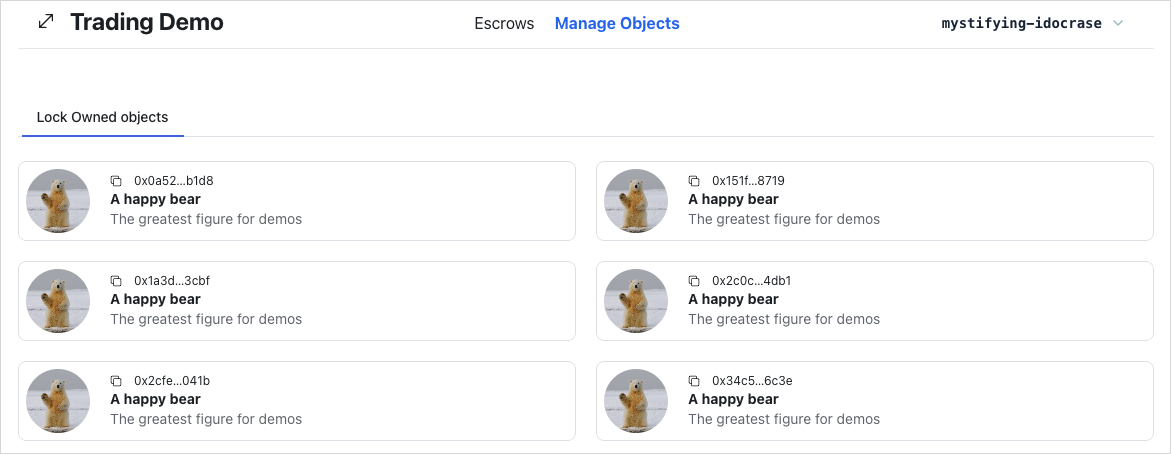
Run your app and ensure you can:
- View the owned objects of the connected wallet account.
If you do not see any objects, you might need to create some demo data or connect your wallet. You can mint objects after completing the next steps.
Execute transaction hook
In the frontend, you might need to execute a transaction in multiple places. Extract the transaction execution logic and reuse it everywhere. Create and examine the execute transaction hook.
Create src/hooks/useTransactionExecution.ts:
src/hooks/useTransactionExecution.ts:import { useSignTransaction, useSuiClient } from "@mysten/dapp-kit";
import { SuiTransactionBlockResponse } from "@mysten/sui/client";
import { Transaction } from "@mysten/sui/transactions";
import toast from "react-hot-toast";
/**
* A hook to execute transactions.
* It signs the transaction using the wallet and executes it through the RPC.
*
* That allows read-after-write consistency and is generally considered a best practice.
*/
export function useTransactionExecution() {
const client = useSuiClient();
const { mutateAsync: signTransactionBlock } = useSignTransaction();
const executeTransaction = async (
txb: Transaction,
): Promise<SuiTransactionBlockResponse | void> => {
try {
const signature = await signTransactionBlock({
transaction: txb,
});
const res = await client.executeTransactionBlock({
transactionBlock: signature.bytes,
signature: signature.signature,
options: {
showEffects: true,
showObjectChanges: true,
},
});
toast.success("Successfully executed transaction!");
return res;
} catch (e: any) {
toast.error(`Failed to execute transaction: ${e.message as string}`);
}
};
return executeTransaction;
}
A Transaction is the input. Sign it with the current connected wallet account, execute the transaction, return the execution result, and finally display a basic toast message to indicate whether the transaction is successful or not.
Use the useCurrentClient() hook from dApp Kit to retrieve the Sui client instance configured in src/main.tsx. The useSignTransaction() function is another hook from dApp kit that helps to sign the transaction using the currently connected wallet. It displays the UI for users to review and sign their transactions with their selected wallet. To execute a transaction, use the executeTransaction() on the client instance of the Sui TypeScript SDK.
Generate demo data
The full source code of the demo bear smart contract is available at Trading Contracts Demo directory
You need a utility function to create a dummy object representing a real world asset so you can use it to test and demonstrate escrow users flow on the UI directly.
Create src/mutations/demo.ts:
src/mutations/demo.ts:import { CONSTANTS, QueryKey } from "@/constants";
import { useTransactionExecution } from "@/hooks/useTransactionExecution";
import { useCurrentAccount } from "@mysten/dapp-kit";
import { Transaction } from "@mysten/sui/transactions";
import { useMutation, useQueryClient } from "@tanstack/react-query";
/**
* A mutation to generate demo data as part of our demo.
*/
export function useGenerateDemoData() {
const account = useCurrentAccount();
const executeTransaction = useTransactionExecution();
const queryClient = useQueryClient();
return useMutation({
mutationFn: async () => {
if (!account?.address)
throw new Error("You need to connect your wallet!");
const txb = new Transaction();
const bear = txb.moveCall({
target: `${CONSTANTS.demoContract.packageId}::demo_bear::new`,
arguments: [txb.pure.string(`A happy bear`)],
});
txb.transferObjects([bear], txb.pure.address(account.address));
return executeTransaction(txb);
},
onSuccess: () => {
queryClient.invalidateQueries({
queryKey: [QueryKey.GetOwnedObjects],
});
},
});
}
This example uses @tanstack/react-query to query, cache, and mutate server state. Server state is data only available on remote servers, and the only way to retrieve or update this data is by interacting with these remote servers. In this case, it could be from an API or directly from Sui blockchain RPC.
When you execute a transaction call to mutate data on the Sui blockchain, use the useMutation() hook. The useMutation() hook accepts several inputs. However, you only need 2 of them for this example. The first parameter, mutationFn, accepts the function to execute the main mutating logic, while the second parameter, onSuccess, is a callback that runs when the mutating logic succeeds.
The main mutating logic includes executing a Move call of a package named demo_bear::new to create a dummy bear object and transferring it to the connected wallet account, all within the same Transaction. This example reuses the executeTransaction() hook from the Execute Transaction Hook step to execute the transaction.
Another benefit of wrapping the main mutating logic inside useMutation() is that you can access and manipulate the cache storing server state. This example fetches the cache from remote servers by using query call in an appropriate callback. In this case, it is the onSuccess callback. When the transaction succeeds, invalidate the cache data at the cache key called getOwnedObjects, then @tanstack/react-query handles the re-fetching mechanism for the invalidated data automatically. Do this by using invalidateQueries() on the @tanstack/react-query configured client instance retrieved by useQueryClient() hook in the Set up Routing step.
Now the logic to create a dummy bear object exists. You just need to attach it into the button in the header.
Header.tsx
Header.tsximport { useGenerateDemoData } from "@/mutations/demo";
import { ConnectButton } from "@mysten/dapp-kit";
import { SizeIcon } from "@radix-ui/react-icons";
import { Box, Button, Container, Flex, Heading } from "@radix-ui/themes";
import { NavLink } from "react-router-dom";
const menu = [
{
title: "Escrows",
link: "/escrows",
},
{
title: "Manage Objects",
link: "/locked",
},
];
export function Header() {
const { mutate: demoBearMutation, isPending } = useGenerateDemoData();
return (
<Container>
<Flex
position="sticky"
px="4"
py="2"
justify="between"
className="border-b flex flex-wrap"
>
<Box>
<Heading className="flex items-center gap-3">
<SizeIcon width={24} height={24} />
Trading Demo
</Heading>
</Box>
<Box className="flex gap-5 items-center">
{menu.map((item) => (
<NavLink
key={item.link}
to={item.link}
className={({ isActive, isPending }) =>
`cursor-pointer flex items-center gap-2 ${
isPending
? "pending"
: isActive
? "font-bold text-blue-600"
: ""
}`
}
>
{item.title}
</NavLink>
))}
</Box>
<Box>
<Button
className="cursor-pointer"
disabled={isPending}
onClick={() => {
demoBearMutation();
}}
>
New Demo Bear
</Button>
</Box>
<Box className="connect-wallet-wrapper">
<ConnectButton />
</Box>
</Flex>
</Container>
);
}
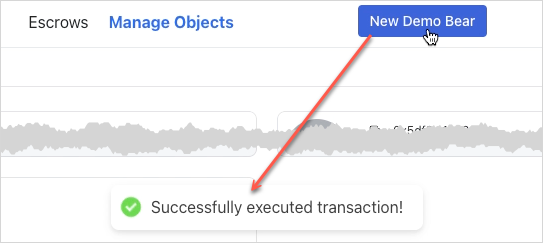
Run your app and ensure you can:
- Mint a demo bear object and view it in the
Manage Objectstab.
Locking owned objects
To lock the object, execute the lock Move function identified by {PACKAGE_ID}::lock::lock. The implementation is similar to previous mutation functions. Use useMutation() from @tanstack/react-query to wrap the main logic inside it. The lock function requires an object to be locked and its type because the smart contract lock function is generic and requires type parameters. After creating a Locked object and its Key object, transfer them to the connected wallet account within the same transaction.
Extract logic of locking owned objects into a separated mutating function to enhance discoverability and encapsulation.
Create src/mutations/locked.ts:
src/mutations/locked.ts:import { useCurrentAccount } from '@mysten/dapp-kit-react';
import { SuiObjectData } from '@mysten/sui/jsonRpc';
import { Transaction } from '@mysten/sui/transactions';
import { useMutation } from '@tanstack/react-query';
import { CONSTANTS } from '@/constants';
import { useTransactionExecution } from '@/hooks/useTransactionExecution';
/**
* Builds and executes the PTB to lock an object.
*/
export function useLockObjectMutation() {
const account = useCurrentAccount();
const executeTransaction = useTransactionExecution();
return useMutation({
mutationFn: async ({ object }: { object: SuiObjectData }) => {
if (!account?.address) throw new Error('You need to connect your wallet!');
const txb = new Transaction();
const [locked, key] = txb.moveCall({
target: `${CONSTANTS.escrowContract.packageId}::lock::lock`,
arguments: [txb.object(object.objectId)],
typeArguments: [object.type!],
});
txb.transferObjects([locked, key], txb.pure.address(account.address));
return executeTransaction(txb);
},
});
}
Update src/components/locked/LockOwnedObjects.tsx to include the useLockObjectMutation hook:
LockOwnedObjects.tsx
LockOwnedObjects.tsximport { useCurrentAccount, useSuiClientInfiniteQuery } from "@mysten/dapp-kit";
import { SuiObjectDisplay } from "@/components/SuiObjectDisplay";
import { Button } from "@radix-ui/themes";
import { LockClosedIcon } from "@radix-ui/react-icons";
import { InfiniteScrollArea } from "@/components/InfiniteScrollArea";
import { useLockObjectMutation } from "@/mutations/locked";
/**
* A component that fetches all the objects owned by the connected wallet address
* and allows the user to lock them, so they can be used in escrow.
*/
export function LockOwnedObjects() {
const account = useCurrentAccount();
const { mutate: lockObjectMutation, isPending } = useLockObjectMutation();
const { data, fetchNextPage, isFetchingNextPage, hasNextPage, refetch } =
useSuiClientInfiniteQuery(
"getOwnedObjects",
{
owner: account?.address!,
options: {
showDisplay: true,
showType: true,
},
},
{
enabled: !!account,
select: (data) =>
data.pages
.flatMap((page) => page.data)
.filter(
// we're filtering out objects that don't have Display or image_url
// for demo purposes. The Escrow contract works with all objects.
(x) => !!x.data?.display && !!x.data?.display?.data?.image_url,
),
},
);
return (
<InfiniteScrollArea
loadMore={() => fetchNextPage()}
hasNextPage={hasNextPage}
loading={isFetchingNextPage}
>
{data?.map((obj) => (
<SuiObjectDisplay object={obj.data!}>
<div className="p-4 pt-1 text-right flex items-center justify-between">
<p className="text-sm">
Lock the item so it can be used for escrows.
</p>
<Button
className="cursor-pointer"
disabled={isPending}
onClick={() => {
lockObjectMutation(
{ object: obj.data! },
{
onSuccess: () => refetch(),
},
);
}}
>
<LockClosedIcon />
Lock Item
</Button>
</div>
</SuiObjectDisplay>
))}
</InfiniteScrollArea>
);
}
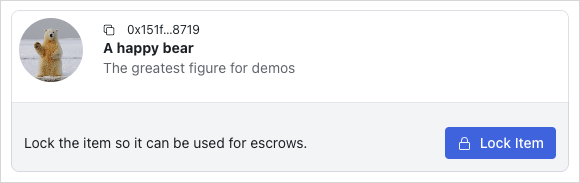
Run your app and ensure you can:
- Lock an owned object.
The object should disappear from the list of owned objects. You view and unlock locked objects in later steps.
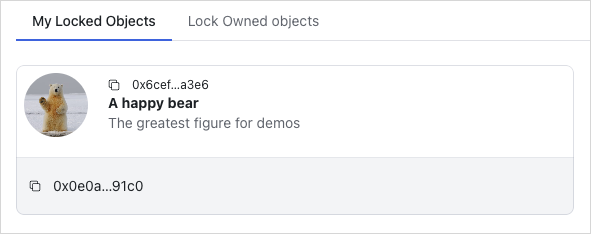
Display owned locked objects
Take a look at the My Locked Objects tab by examining src/components/locked/OwnedLockedList.tsx. Focus on the logic on how to retrieve this list.
OwnedLockedList.tsx
OwnedLockedList.tsximport { CONSTANTS } from "@/constants";
import { InfiniteScrollArea } from "@/components/InfiniteScrollArea";
import { useCurrentAccount, useSuiClientInfiniteQuery } from "@mysten/dapp-kit";
import { LockedObject } from "./LockedObject";
/**
* Similar to the `ApiLockedList` but fetches the owned locked objects
* but fetches the objects from the on-chain state, instead of relying on the indexer API.
*/
export function OwnedLockedList() {
const account = useCurrentAccount();
const { data, isLoading, fetchNextPage, hasNextPage, isFetchingNextPage } =
useSuiClientInfiniteQuery(
"getOwnedObjects",
{
filter: {
StructType: CONSTANTS.escrowContract.lockedType,
},
owner: account?.address!,
options: {
showContent: true,
showOwner: true,
},
},
{
enabled: !!account?.address,
select: (data) => data.pages.flatMap((page) => page.data),
},
);
return (
<>
<InfiniteScrollArea
loadMore={() => fetchNextPage()}
hasNextPage={hasNextPage}
loading={isFetchingNextPage || isLoading}
>
{data?.map((item) => (
<LockedObject key={item.data?.objectId} object={item.data!} />
))}
</InfiniteScrollArea>
</>
);
}
This query pattern is similar to the one in the LockOwnedObjects component. The difference is that it fetches the locked objects instead of the owned objects. The Locked object is a struct type in the smart contract, so you need to supply the struct type to the query call as a filter. The struct type is usually identified by the format of {PACKAGE_ID}::{MODULE_NAME}::{STRUCT_TYPE}.
LockedObject and Locked component
The <LockedObject /> (src/components/locked/LockedObject.tsx) component is mainly responsible for mapping an on-chain SuiObjectData Locked object to its corresponding ApiLockedObject, which is finally delegated to the <Locked /> component for rendering. The <LockedObject /> fetches the locked item object ID if the prop itemId is not supplied by using TanStack Query's useQuery hook with the useCurrentClient() hook to call the getDynamicFieldObject RPC endpoint. Recall that in this smart contract, the locked item is put into a dynamic object field.
LockedObject.tsx
LockedObject.tsximport { CONSTANTS } from "@/constants";
import { useSuiClientQuery } from "@mysten/dapp-kit";
import { Locked } from "./partials/Locked";
import { SuiObjectData } from "@mysten/sui/client";
/**
* Acts as a wrapper between the `Locked` object fetched from API
* and the on-chain object state.
*
* Accepts an `object` of type `::locked::Locked`, fetches the itemID (though the DOF)
* and then renders the `Locked` component.
*
* ItemId is optional because we trust the API to return the correct itemId for each Locked.
*/
export function LockedObject({
object,
itemId,
hideControls,
}: {
object: SuiObjectData;
itemId?: string;
hideControls?: boolean;
}) {
const owner = () => {
if (
!object.owner ||
typeof object.owner === "string" ||
!("AddressOwner" in object.owner)
)
return undefined;
return object.owner.AddressOwner;
};
const getKeyId = (item: SuiObjectData) => {
if (
!(item.content?.dataType === "moveObject") ||
!("key" in item.content.fields)
)
return "";
return item.content.fields.key as string;
};
// Get the itemID for the locked object (We've saved it as a DOF on the SC).
const suiObjectId = useSuiClientQuery(
"getDynamicFieldObject",
{
parentId: object.objectId,
name: {
type: CONSTANTS.escrowContract.lockedObjectDFKey,
value: {
dummy_field: false,
},
},
},
{
select: (data) => data.data,
enabled: !itemId,
},
);
return (
<Locked
locked={{
itemId: itemId || suiObjectId.data?.objectId!,
objectId: object.objectId,
keyId: getKeyId(object),
creator: owner(),
deleted: false,
}}
hideControls={hideControls}
/>
);
}
The <Locked /> (src/components/locked/partials/Locked.tsx) component is mainly responsible for rendering the ApiLockedObject. Later on, it also consists of several on-chain interactions: unlock the locked objects and create an escrow out of the locked object.
Locked.tsx
Locked.tsximport { useCurrentAccount, useCurrentClient } from '@mysten/dapp-kit-react';
import { useQuery } from '@tanstack/react-query';
import { SuiObjectDisplay } from '@/components/SuiObjectDisplay';
import { ApiLockedObject } from '@/types/types';
import { ExplorerLink } from '../../ExplorerLink';
/**
* Prefer to use the `Locked` component only through `LockedObject`.
*
* This can also render data directly from the API, but we prefer
* to also validate ownership from on-chain state (as objects are transferable)
* and the API cannot track all the ownership changes.
*/
export function Locked({
locked,
hideControls,
}: {
locked: ApiLockedObject;
hideControls?: boolean;
}) {
const account = useCurrentAccount();
const client = useCurrentClient();
const suiObject = useQuery({
queryKey: ['getObject', locked.itemId],
queryFn: async () => {
const { object } = await client.core.getObject({
objectId: locked.itemId,
});
return object;
},
});
const getLabel = () => {
if (locked.deleted) return 'Deleted';
if (hideControls) {
if (locked.creator === account?.address) return 'You offer this';
return "You'll receive this if accepted";
}
return undefined;
};
const getLabelClasses = () => {
if (locked.deleted) return 'bg-red-50 rounded px-3 py-1 text-sm text-red-500';
if (hideControls) {
if (!!locked.creator && locked.creator === account?.address)
return 'bg-blue-50 rounded px-3 py-1 text-sm text-blue-500';
return 'bg-green-50 rounded px-3 py-1 text-sm text-green-700';
}
return undefined;
};
return (
<SuiObjectDisplay object={suiObject.data!} label={getLabel()} labelClasses={getLabelClasses()}>
<div className="p-4 pt-1 text-right flex flex-wrap items-center justify-between">
{
<p className="text-sm flex-shrink-0 flex items-center gap-2">
<ExplorerLink id={locked.objectId} isAddress={false} />
</p>
}
</div>
</SuiObjectDisplay>
);
}
Update src/routes/LockedDashboard.tsx to include the OwnedLockedList component:
LockedDashboard.tsx
LockedDashboard.tsximport { useState } from "react";
import { Tabs } from "@radix-ui/themes";
import { LockOwnedObjects } from "@/components/locked/LockOwnedObjects";
import { OwnedLockedList } from "@/components/locked/OwnedLockedList";
export function LockedDashboard() {
const tabs = [
{
name: "My Locked Objects",
component: () => <OwnedLockedList />,
},
{
name: "Lock Owned objects",
component: () => <LockOwnedObjects />,
},
];
const [tab, setTab] = useState(tabs[0].name);
return (
<Tabs.Root value={tab} onValueChange={setTab}>
<Tabs.List>
{tabs.map((tab, index) => {
return (
<Tabs.Trigger
key={index}
value={tab.name}
className="cursor-pointer"
>
{tab.name}
</Tabs.Trigger>
);
})}
</Tabs.List>
{tabs.map((tab, index) => {
return (
<Tabs.Content key={index} value={tab.name}>
{tab.component()}
</Tabs.Content>
);
})}
</Tabs.Root>
);
}
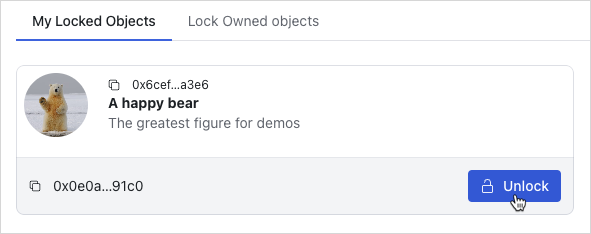
Run your app and ensure you can:
- View the locked objects of the connected wallet account.
Unlocking owned objects
To unlock the object, execute the unlock Move function identified by {PACKAGE_ID}::lock::unlock. Call the unlock function supplying the Locked object, its corresponding Key, the struct type of the original object, and transfer the unlocked object to the current connected wallet account. Also, implement the onSuccess callback to invalidate the cache data at query key locked after one second to force react-query to re-fetch the data at corresponding query key automatically.
Unlocking owned objects is another crucial and complex on-chain action in this application. Extract its logic into separated mutating functions to enhance discoverability and encapsulation.
src/mutations/locked.ts
src/mutations/locked.tsimport { CONSTANTS, QueryKey } from "@/constants";
import { useTransactionExecution } from "@/hooks/useTransactionExecution";
import { useCurrentAccount, useSuiClient } from "@mysten/dapp-kit";
import { SuiObjectData } from "@mysten/sui/client";
import { Transaction } from "@mysten/sui/transactions";
import { useMutation, useQueryClient } from "@tanstack/react-query";
import toast from "react-hot-toast";
/**
* Builds and executes the PTB to lock an object.
*/
export function useLockObjectMutation() {
const account = useCurrentAccount();
const executeTransaction = useTransactionExecution();
return useMutation({
mutationFn: async ({ object }: { object: SuiObjectData }) => {
if (!account?.address)
throw new Error("You need to connect your wallet!");
const txb = new Transaction();
const [locked, key] = txb.moveCall({
target: `${CONSTANTS.escrowContract.packageId}::lock::lock`,
arguments: [txb.object(object.objectId)],
typeArguments: [object.type!],
});
txb.transferObjects([locked, key], txb.pure.address(account.address));
return executeTransaction(txb);
},
});
}
/**
* Builds and executes the PTB to unlock an object.
*/
export function useUnlockMutation() {
const account = useCurrentAccount();
const executeTransaction = useTransactionExecution();
const client = useSuiClient();
const queryClient = useQueryClient();
return useMutation({
mutationFn: async ({
lockedId,
keyId,
suiObject,
}: {
lockedId: string;
keyId: string;
suiObject: SuiObjectData;
}) => {
if (!account?.address)
throw new Error("You need to connect your wallet!");
const key = await client.getObject({
id: keyId,
options: {
showOwner: true,
},
});
if (
!key.data?.owner ||
typeof key.data.owner === "string" ||
!("AddressOwner" in key.data.owner) ||
key.data.owner.AddressOwner !== account.address
) {
toast.error("You are not the owner of the key");
return;
}
const txb = new Transaction();
const item = txb.moveCall({
target: `${CONSTANTS.escrowContract.packageId}::lock::unlock`,
typeArguments: [suiObject.type!],
arguments: [txb.object(lockedId), txb.object(keyId)],
});
txb.transferObjects([item], txb.pure.address(account.address));
return executeTransaction(txb);
},
onSuccess: () => {
setTimeout(() => {
// invalidating the queries after a small latency
// because the indexer works in intervals of 1s.
// if we invalidate too early, we might not get the latest state.
queryClient.invalidateQueries({
queryKey: [QueryKey.Locked],
});
}, 1_000);
},
});
}
Update src/components/locked/partials/Locked.tsx to include the useUnlockObjectMutation hook:
Locked.tsx
Locked.tsximport { useCurrentAccount, useCurrentClient } from '@mysten/dapp-kit-react';
import { ArrowDownIcon, ArrowUpIcon, LockOpen1Icon } from '@radix-ui/react-icons';
import { Button } from '@radix-ui/themes';
import { useQuery } from '@tanstack/react-query';
import { useState } from 'react';
import { SuiObjectDisplay } from '@/components/SuiObjectDisplay';
import { useUnlockMutation } from '@/mutations/locked';
import { ApiLockedObject } from '@/types/types';
import { ExplorerLink } from '../../ExplorerLink';
export function Locked({
locked,
hideControls,
}: {
locked: ApiLockedObject;
hideControls?: boolean;
}) {
const [isToggled, setIsToggled] = useState(false);
const account = useCurrentAccount();
const client = useCurrentClient();
const { mutate: unlockMutation, isPending } = useUnlockMutation();
const suiObject = useQuery({
queryKey: ['getObject', locked.itemId],
queryFn: async () => {
const { object } = await client.core.getObject({
objectId: locked.itemId,
});
return object;
},
});
const isOwner = () => {
return !!locked.creator && account?.address === locked.creator;
};
const getLabel = () => {
if (locked.deleted) return 'Deleted';
if (hideControls) {
if (locked.creator === account?.address) return 'You offer this';
return "You'll receive this if accepted";
}
return undefined;
};
const getLabelClasses = () => {
if (locked.deleted) return 'bg-red-50 rounded px-3 py-1 text-sm text-red-500';
if (hideControls) {
if (!!locked.creator && locked.creator === account?.address)
return 'bg-blue-50 rounded px-3 py-1 text-sm text-blue-500';
return 'bg-green-50 rounded px-3 py-1 text-sm text-green-700';
}
return undefined;
};
return (
<SuiObjectDisplay object={suiObject.data!} label={getLabel()} labelClasses={getLabelClasses()}>
<div className="p-4 pt-1 text-right flex flex-wrap items-center justify-between">
{
<p className="text-sm flex-shrink-0 flex items-center gap-2">
<ExplorerLink id={locked.objectId} isAddress={false} />
</p>
}
{!hideControls && isOwner() && (
<Button
className="ml-auto cursor-pointer"
disabled={isPending}
onClick={() => {
unlockMutation({
lockedId: locked.objectId,
keyId: locked.keyId,
suiObject: suiObject.data!,
});
}}
>
<LockOpen1Icon /> Unlock
</Button>
)}
</div>
</SuiObjectDisplay>
);
}
Run your app and ensure you can:
- Unlock a locked object.
Display locked objects to escrow
Update src/routes/EscrowDashboard.tsx to include the LockedList component:
EscrowDashboard.tsx
EscrowDashboard.tsximport { InfoCircledIcon } from '@radix-ui/react-icons';
import { Tabs, Tooltip } from '@radix-ui/themes';
import { useState } from 'react';
import { LockedList } from '../components/locked/ApiLockedList';
export function EscrowDashboard() {
const tabs = [
{
name: 'Browse Locked Objects',
component: () => (
<LockedList
params={{
deleted: 'false',
}}
enableSearch
/>
),
tooltip: 'Browse locked objects you can trade for.',
},
];
const [tab, setTab] = useState(tabs[0].name);
return (
<Tabs.Root value={tab} onValueChange={setTab}>
<Tabs.List>
{tabs.map((tab, index) => {
return (
<Tabs.Trigger key={index} value={tab.name} className="cursor-pointer">
{tab.name}
<Tooltip content={tab.tooltip}>
<InfoCircledIcon className="ml-3" />
</Tooltip>
</Tabs.Trigger>
);
})}
</Tabs.List>
{tabs.map((tab, index) => {
return (
<Tabs.Content key={index} value={tab.name}>
{tab.component()}
</Tabs.Content>
);
})}
</Tabs.Root>
);
}
Add src/components/locked/ApiLockedList.tsx:
ApiLockedList.tsx
ApiLockedList.tsximport { useInfiniteQuery } from "@tanstack/react-query";
import { CONSTANTS, QueryKey } from "@/constants";
import { InfiniteScrollArea } from "@/components/InfiniteScrollArea";
import { ApiLockedObject, LockedListingQuery } from "@/types/types";
import { constructUrlSearchParams, getNextPageParam } from "@/utils/helpers";
import { useSuiClient } from "@mysten/dapp-kit";
import { TextField } from "@radix-ui/themes";
import { useState } from "react";
import { LockedObject } from "./LockedObject";
import { useGetLockedObject } from "@/hooks/useGetLockedObject";
/**
* Fetches all the non-deleted system `Locked` objects from the API in a paginated fashion.
* Then, it proceeds into fetching the on-chain state, so we can better trust the latest
* state of the object in regards to ownership.
*
* We do this because `Locked` object has `store` ability, so that means that the `creator` field
* from the API could be stale.
*/
export function LockedList({
enableSearch,
params,
}: {
isPersonal?: boolean;
enableSearch?: boolean;
params: LockedListingQuery;
}) {
const [lockedId, setLockedId] = useState("");
const suiClient = useSuiClient();
const { data: searchData } = useGetLockedObject({
lockedId,
});
const { data, fetchNextPage, hasNextPage, isLoading, isFetchingNextPage } =
useInfiniteQuery({
initialPageParam: null,
queryKey: [QueryKey.Locked, params, lockedId],
queryFn: async ({ pageParam }) => {
/*
* Fetch the locked objects from the API.
*/
const data = await (
await fetch(
CONSTANTS.apiEndpoint +
"locked" +
constructUrlSearchParams({
deleted: "false",
...(pageParam ? { cursor: pageParam as string } : {}),
...(params || {}),
}),
)
).json();
/*
* Use the objectIds from the API to fetch the on-chain state. This is done to ensure that
* the ownership of each object is up-to-date.
*/
const objects = await suiClient.multiGetObjects({
ids: data.data.map((x: ApiLockedObject) => x.objectId),
options: {
showOwner: true,
showContent: true,
},
});
return {
suiObjects: objects.map((x) => x.data),
api: data,
};
},
select: (data) => data.pages,
getNextPageParam,
enabled: !lockedId,
});
/**
* Returns all `Locked` objects or the one that matches the search query if it exists.
*/
const suiObjects = () => {
if (lockedId) {
if (
!searchData?.data?.type?.startsWith(CONSTANTS.escrowContract.lockedType)
)
return [];
return [searchData?.data!];
}
return data?.flatMap((x) => x.suiObjects) || [];
};
const apiData = () => {
return data?.flatMap((x) => x.api.data);
};
// Find the itemID from the API request to skip fetching the DF on-chain.
// We can always be certain that the itemID can't change for a given `Locked` object.
const getItemId = (objectId?: string) => {
return apiData()?.find((x) => x.objectId === objectId)?.itemId;
};
return (
<>
{enableSearch && (
<TextField.Root
className="mt-3"
placeholder="Search by locked id"
value={lockedId}
onChange={(e) => setLockedId(e.target.value)}
></TextField.Root>
)}
<InfiniteScrollArea
loadMore={() => fetchNextPage()}
hasNextPage={hasNextPage}
loading={isFetchingNextPage || isLoading}
>
{suiObjects().map((object) => (
<LockedObject
key={object?.objectId!}
object={object!}
itemId={getItemId(object?.objectId)}
/>
))}
</InfiniteScrollArea>
</>
);
}
This hook fetches all the non-deleted system Locked objects from the API in a paginated fashion. Then, it proceeds into fetching the on-chain state, to ensure the latest state of the object is displayed.
Add src/hooks/useGetLockedObject.ts
src/hooks/useGetLockedObject.tsimport { useSuiClientQuery } from "@mysten/dapp-kit";
/**
* A re-usable hook for querying a locked object by ID
* from the on-chain state.
*/
export function useGetLockedObject({ lockedId }: { lockedId: string }) {
return useSuiClientQuery(
"getObject",
{
id: lockedId,
options: {
showType: true,
showOwner: true,
showContent: true,
},
},
{
enabled: !!lockedId,
},
);
}
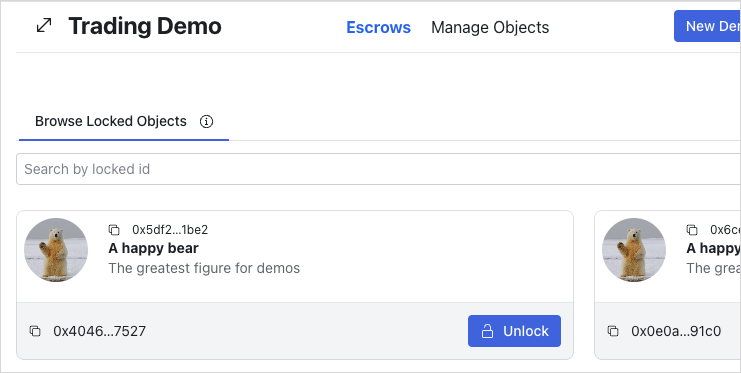
Run your app and ensure you can:
- View the locked objects in the
Browse Locked Objectstab in theEscrowspage.
Create escrows
To create escrows, include a mutating function through the useCreateEscrowMutation hook in src/mutations/escrow.ts. It accepts the escrowed item to be traded and the ApiLockedObject from another party as parameters. Then, call the {PACKAGE_ID}::shared::create Move function and provide the escrowed item, the key ID of the locked object to exchange, and the recipient of the escrow (locked object's owner).
escrow.ts
escrow.tsimport { useCurrentAccount } from '@mysten/dapp-kit-react';
import { SuiObjectData } from '@mysten/sui/jsonRpc';
import { Transaction } from '@mysten/sui/transactions';
import { useMutation } from '@tanstack/react-query';
import { CONSTANTS } from '@/constants';
import { useTransactionExecution } from '@/hooks/useTransactionExecution';
import { ApiLockedObject } from '@/types/types';
/**
* Builds and executes the PTB to create an escrow.
*/
export function useCreateEscrowMutation() {
const currentAccount = useCurrentAccount();
const executeTransaction = useTransactionExecution();
return useMutation({
mutationFn: async ({ object, locked }: { object: SuiObjectData; locked: ApiLockedObject }) => {
if (!currentAccount?.address) throw new Error('You need to connect your wallet!');
const txb = new Transaction();
txb.moveCall({
target: `${CONSTANTS.escrowContract.packageId}::shared::create`,
arguments: [
txb.object(object.objectId!),
txb.pure.id(locked.keyId),
txb.pure.address(locked.creator!),
],
typeArguments: [object.type!],
});
return executeTransaction(txb);
},
});
}
Update src/components/locked/partials/Locked.tsx to include the useCreateEscrowMutation hook
src/components/locked/partials/Locked.tsx to include the useCreateEscrowMutation hookimport { useCurrentAccount, useSuiClientQuery } from "@mysten/dapp-kit";
import { SuiObjectDisplay } from "@/components/SuiObjectDisplay";
import { Button } from "@radix-ui/themes";
import {
ArrowDownIcon,
ArrowUpIcon,
LockOpen1Icon,
} from "@radix-ui/react-icons";
import { ExplorerLink } from "../../ExplorerLink";
import { useState } from "react";
import { ApiLockedObject } from "@/types/types";
import { CreateEscrow } from "../../escrows/CreateEscrow";
import { useUnlockMutation } from "@/mutations/locked";
/**
* Prefer to use the `Locked` component only through `LockedObject`.
*
* This can also render data directly from the API, but we prefer
* to also validate ownership from on-chain state (as objects are transferrable)
* and the API cannot track all the ownership changes.
*/
export function Locked({
locked,
hideControls,
}: {
locked: ApiLockedObject;
hideControls?: boolean;
}) {
const [isToggled, setIsToggled] = useState(false);
const account = useCurrentAccount();
const { mutate: unlockMutation, isPending } = useUnlockMutation();
const suiObject = useSuiClientQuery(
"getObject",
{
id: locked.itemId,
options: {
showDisplay: true,
showType: true,
showOwner: true,
},
},
{
select: (data) => data.data,
},
);
const isOwner = () => {
return !!locked.creator && account?.address === locked.creator;
};
const getLabel = () => {
if (locked.deleted) return "Deleted";
if (hideControls) {
if (locked.creator === account?.address) return "You offer this";
return "You'll receive this if accepted";
}
return undefined;
};
const getLabelClasses = () => {
if (locked.deleted)
return "bg-red-50 rounded px-3 py-1 text-sm text-red-500";
if (hideControls) {
if (!!locked.creator && locked.creator === account?.address)
return "bg-blue-50 rounded px-3 py-1 text-sm text-blue-500";
return "bg-green-50 rounded px-3 py-1 text-sm text-green-700";
}
return undefined;
};
return (
<SuiObjectDisplay
object={suiObject.data!}
label={getLabel()}
labelClasses={getLabelClasses()}
>
<div className="p-4 pt-1 text-right flex flex-wrap items-center justify-between">
{
<p className="text-sm flex-shrink-0 flex items-center gap-2">
<ExplorerLink id={locked.objectId} isAddress={false} />
</p>
}
{!hideControls && isOwner() && (
<Button
className="ml-auto cursor-pointer"
disabled={isPending}
onClick={() => {
unlockMutation({
lockedId: locked.objectId,
keyId: locked.keyId,
suiObject: suiObject.data!,
});
}}
>
<LockOpen1Icon /> Unlock
</Button>
)}
{!hideControls && !isOwner() && (
<Button
className="ml-auto cursor-pointer bg-transparent text-black disabled:opacity-40"
disabled={!account?.address}
onClick={() => setIsToggled(!isToggled)}
>
Start Escrow
{isToggled ? <ArrowUpIcon /> : <ArrowDownIcon />}
</Button>
)}
{isToggled && (
<div className="min-w-[340px] w-full justify-self-start text-left">
<CreateEscrow locked={locked} />
</div>
)}
</div>
</SuiObjectDisplay>
);
}
Add src/components/escrows/CreateEscrow.tsx
src/components/escrows/CreateEscrow.tsximport { ApiLockedObject } from "@/types/types";
import { useCurrentAccount, useSuiClientInfiniteQuery } from "@mysten/dapp-kit";
import { formatAddress } from "@mysten/sui/utils";
import { Avatar, Button, Select } from "@radix-ui/themes";
import { InfiniteScrollArea } from "@/components/InfiniteScrollArea";
import { useState } from "react";
import { ExplorerLink } from "../ExplorerLink";
import { useCreateEscrowMutation } from "@/mutations/escrow";
/**
* A component that allows the user to create an escrow for a locked object.
* It fetches all the objects owned by the connected wallet address and allows the user to
* select one to put on escrow.
*/
export function CreateEscrow({ locked }: { locked: ApiLockedObject }) {
const [objectId, setObjectId] = useState<string | undefined>(undefined);
const account = useCurrentAccount();
const { mutate: createEscrowMutation, isPending } = useCreateEscrowMutation();
const { data, fetchNextPage, isFetchingNextPage, hasNextPage, refetch } =
useSuiClientInfiniteQuery(
"getOwnedObjects",
{
owner: account?.address!,
options: {
showDisplay: true,
showType: true,
},
},
{
enabled: !!account,
select: (data) =>
data.pages
.flatMap((page) => page.data)
.filter(
// we're filtering out objects that don't have Display or image_url
// for demo purposes. The Escrow contract works with all objects.
(x) => !!x.data?.display && !!x.data?.display?.data?.image_url,
),
},
);
const getObject = () => {
const object = data?.find((x) => x.data?.objectId === objectId);
if (!object || !object.data) {
return;
}
return object.data;
};
return (
<div className="px-3 py-3 grid grid-cols-1 gap-5 mt-3 rounded">
<div>
<label className="text-xs">The recipient will be:</label>
<ExplorerLink id={locked.creator!} isAddress />
</div>
<div>
<label className="text-xs">Select which object to put on escrow:</label>
<Select.Root value={objectId} onValueChange={setObjectId}>
<Select.Trigger
className="h-auto min-h-[25px] w-full mt-3 py-2"
placeholder="Pick an object"
/>
<Select.Content className="max-w-[550px] overflow-hidden">
<Select.Group>
<Select.Label>Select an Object</Select.Label>
<InfiniteScrollArea
loadMore={() => fetchNextPage()}
hasNextPage={hasNextPage}
loading={isFetchingNextPage}
gridClasses="grid-cols-1 gap-2"
>
{data?.map((object) => {
return (
<Select.Item
key={object.data?.objectId!}
value={object.data?.objectId!}
className="h-auto w-full data-[state=checked]:bg-blue-50 whitespace-pre-wrap overflow-hidden break-words hover:bg-blue-50 bg-white text-black cursor-pointer"
>
<div className="flex items-center break-words">
<Avatar
size="2"
radius="medium"
fallback="*"
className="mr-3"
src={object.data?.display?.data?.image_url!}
/>
<div className="text-xs overflow-ellipsis">
{(object.data?.display?.data?.name || "-").substring(
0,
100,
)}
<p className="text-gray-600">
{formatAddress(object.data?.objectId!)}
</p>
</div>
</div>
</Select.Item>
);
})}
</InfiniteScrollArea>
</Select.Group>
</Select.Content>
</Select.Root>
</div>
{objectId && (
<div>
<label className="text-xs">You'll be offering:</label>
<ExplorerLink id={objectId} />
</div>
)}
<div className="text-right">
<Button
className="cursor-pointer"
disabled={isPending || !objectId}
onClick={() => {
createEscrowMutation(
{ locked, object: getObject()! },
{
onSuccess: () => {
refetch();
setObjectId(undefined);
},
},
);
}}
>
Create Escrow
</Button>
</div>
</div>
);
}
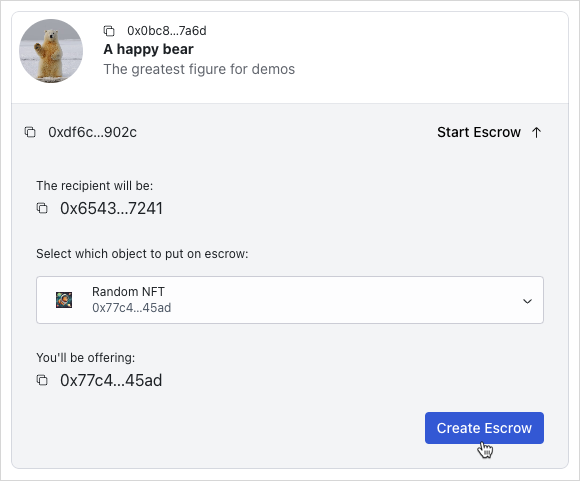
Run your app and ensure you can:
- Create an escrow.
The object should disappear from the list of locked objects in the Browse Locked Objects tab in the Escrows page. You view and accept or cancel escrows in later steps.
Cancel and accept escrows
To cancel an escrow, create a mutation through the useCancelEscrowMutation hook. The cancel function accepts the escrow ApiEscrowObject and its on-chain data. Execute {PACKAGE_ID}::shared::return_to_sender and transfer the returned escrowed object to the creator of the escrow.
To accept an escrow, create a mutation through the useAcceptEscrowMutation hook. The accept function accepts the escrow ApiEscrowObject and the locked object ApiLockedObject. Query the object details using multiGetObjects on the Sui client instance. Execute {PACKAGE_ID}::shared::swap and transfer the returned escrowed item to the connected wallet account.
escrow.ts
escrow.tsimport { CONSTANTS, QueryKey } from "@/constants";
import { useTransactionExecution } from "@/hooks/useTransactionExecution";
import { ApiEscrowObject, ApiLockedObject } from "@/types/types";
import { useCurrentAccount, useSuiClient } from "@mysten/dapp-kit";
import { SuiObjectData } from "@mysten/sui/client";
import { Transaction } from "@mysten/sui/transactions";
import { useMutation, useQueryClient } from "@tanstack/react-query";
/**
* Builds and executes the PTB to create an escrow.
*/
export function useCreateEscrowMutation() {
const currentAccount = useCurrentAccount();
const executeTransaction = useTransactionExecution();
return useMutation({
mutationFn: async ({
object,
locked,
}: {
object: SuiObjectData;
locked: ApiLockedObject;
}) => {
if (!currentAccount?.address)
throw new Error("You need to connect your wallet!");
const txb = new Transaction();
txb.moveCall({
target: `${CONSTANTS.escrowContract.packageId}::shared::create`,
arguments: [
txb.object(object.objectId!),
txb.pure.id(locked.keyId),
txb.pure.address(locked.creator!),
],
typeArguments: [object.type!],
});
return executeTransaction(txb);
},
});
}
/**
* Builds and executes the PTB to cancel an escrow.
*/
export function useCancelEscrowMutation() {
const currentAccount = useCurrentAccount();
const executeTransaction = useTransactionExecution();
const queryClient = useQueryClient();
return useMutation({
mutationFn: async ({
escrow,
suiObject,
}: {
escrow: ApiEscrowObject;
suiObject: SuiObjectData;
}) => {
if (!currentAccount?.address)
throw new Error("You need to connect your wallet!");
const txb = new Transaction();
const item = txb.moveCall({
target: `${CONSTANTS.escrowContract.packageId}::shared::return_to_sender`,
arguments: [txb.object(escrow.objectId)],
typeArguments: [suiObject?.type!],
});
txb.transferObjects([item], txb.pure.address(currentAccount?.address!));
return executeTransaction(txb);
},
onSuccess: () => {
setTimeout(() => {
queryClient.invalidateQueries({ queryKey: [QueryKey.Escrow] });
}, 1_000);
},
});
}
/**
* Builds and executes the PTB to accept an escrow.
*/
export function useAcceptEscrowMutation() {
const currentAccount = useCurrentAccount();
const client = useSuiClient();
const executeTransaction = useTransactionExecution();
const queryClient = useQueryClient();
return useMutation({
mutationFn: async ({
escrow,
locked,
}: {
escrow: ApiEscrowObject;
locked: ApiLockedObject;
}) => {
if (!currentAccount?.address)
throw new Error("You need to connect your wallet!");
const txb = new Transaction();
const escrowObject = await client.multiGetObjects({
ids: [escrow.itemId, locked.itemId],
options: {
showType: true,
},
});
const escrowType = escrowObject.find(
(x) => x.data?.objectId === escrow.itemId,
)?.data?.type;
const lockedType = escrowObject.find(
(x) => x.data?.objectId === locked.itemId,
)?.data?.type;
if (!escrowType || !lockedType) {
throw new Error("Failed to fetch types.");
}
const item = txb.moveCall({
target: `${CONSTANTS.escrowContract.packageId}::shared::swap`,
arguments: [
txb.object(escrow.objectId),
txb.object(escrow.keyId),
txb.object(locked.objectId),
],
typeArguments: [escrowType, lockedType],
});
txb.transferObjects([item], txb.pure.address(currentAccount.address));
return executeTransaction(txb);
},
onSuccess: () => {
setTimeout(() => {
queryClient.invalidateQueries({ queryKey: [QueryKey.Escrow] });
}, 1_000);
},
});
}
Add src/components/escrows/Escrow.tsx
src/components/escrows/Escrow.tsximport { useCurrentAccount, useSuiClientQuery } from "@mysten/dapp-kit";
import { SuiObjectDisplay } from "@/components/SuiObjectDisplay";
import { Button } from "@radix-ui/themes";
import {
ArrowDownIcon,
ArrowUpIcon,
CheckCircledIcon,
Cross1Icon,
} from "@radix-ui/react-icons";
import { CONSTANTS, QueryKey } from "@/constants";
import { ExplorerLink } from "../ExplorerLink";
import { useQuery } from "@tanstack/react-query";
import { useState } from "react";
import { ApiEscrowObject } from "@/types/types";
import {
useAcceptEscrowMutation,
useCancelEscrowMutation,
} from "@/mutations/escrow";
import { useGetLockedObject } from "@/hooks/useGetLockedObject";
import { LockedObject } from "../locked/LockedObject";
/**
* A component that displays an escrow and allows the user to accept or cancel it.
* Accepts an `escrow` object as returned from the API.
*/
export function Escrow({ escrow }: { escrow: ApiEscrowObject }) {
const account = useCurrentAccount();
const [isToggled, setIsToggled] = useState(true);
const { mutate: acceptEscrowMutation, isPending } = useAcceptEscrowMutation();
const { mutate: cancelEscrowMutation, isPending: pendingCancellation } =
useCancelEscrowMutation();
const suiObject = useSuiClientQuery("getObject", {
id: escrow?.itemId,
options: {
showDisplay: true,
showType: true,
},
});
const lockedData = useQuery({
queryKey: [QueryKey.Locked, escrow.keyId],
queryFn: async () => {
const res = await fetch(
`${CONSTANTS.apiEndpoint}locked?keyId=${escrow.keyId}`,
);
return res.json();
},
select: (data) => data.data[0],
enabled: !escrow.cancelled,
});
const { data: suiLockedObject } = useGetLockedObject({
lockedId: lockedData.data?.objectId,
});
const getLabel = () => {
if (escrow.cancelled) return "Cancelled";
if (escrow.swapped) return "Swapped";
if (escrow.sender === account?.address) return "You offer this";
if (escrow.recipient === account?.address) return "You'll receive this";
return undefined;
};
const getLabelClasses = () => {
if (escrow.cancelled) return "text-red-500";
if (escrow.swapped) return "text-green-500";
if (escrow.sender === account?.address)
return "bg-blue-50 rounded px-3 py-1 text-sm text-blue-500";
if (escrow.recipient === account?.address)
return "bg-green-50 rounded px-3 py-1 text-sm text-green-700";
return undefined;
};
return (
<SuiObjectDisplay
object={suiObject.data?.data!}
label={getLabel()}
labelClasses={getLabelClasses()}
>
<div className="p-4 flex gap-3 flex-wrap">
{
<p className="text-sm flex-shrink-0 flex items-center gap-2">
<ExplorerLink id={escrow.objectId} isAddress={false} />
</p>
}
<Button
className="ml-auto cursor-pointer bg-transparent text-black"
onClick={() => setIsToggled(!isToggled)}
>
Details
{isToggled ? <ArrowUpIcon /> : <ArrowDownIcon />}
</Button>
{!escrow.cancelled &&
!escrow.swapped &&
escrow.sender === account?.address && (
<Button
color="amber"
className="cursor-pointer"
disabled={pendingCancellation}
onClick={() =>
cancelEscrowMutation({
escrow,
suiObject: suiObject.data?.data!,
})
}
>
<Cross1Icon />
Cancel request
</Button>
)}
{isToggled && lockedData.data && (
<div className="min-w-[340px] w-full justify-self-start text-left">
{suiLockedObject?.data && (
<LockedObject
object={suiLockedObject.data}
itemId={lockedData.data.itemId}
hideControls
/>
)}
{!lockedData.data.deleted &&
escrow.recipient === account?.address && (
<div className="text-right mt-5">
<p className="text-xs pb-3">
When accepting the exchange, the escrowed item will be
transferred to you and your locked item will be transferred
to the sender.
</p>
<Button
className="cursor-pointer"
disabled={isPending}
onClick={() =>
acceptEscrowMutation({
escrow,
locked: lockedData.data,
})
}
>
<CheckCircledIcon /> Accept exchange
</Button>
</div>
)}
{lockedData.data.deleted &&
!escrow.swapped &&
escrow.recipient === account?.address && (
<div>
<p className="text-red-500 text-sm py-2 flex items-center gap-3">
<Cross1Icon />
The locked object has been deleted so you can't accept this
anymore.
</p>
</div>
)}
</div>
)}
</div>
</SuiObjectDisplay>
);
}
Add src/components/escrows/EscrowList.tsx
src/components/escrows/EscrowList.tsximport { useInfiniteQuery } from "@tanstack/react-query";
import { CONSTANTS, QueryKey } from "@/constants";
import { Escrow } from "./Escrow";
import { InfiniteScrollArea } from "@/components/InfiniteScrollArea";
import { constructUrlSearchParams, getNextPageParam } from "@/utils/helpers";
import { ApiEscrowObject, EscrowListingQuery } from "@/types/types";
import { useState } from "react";
import { TextField } from "@radix-ui/themes";
/**
* A component that fetches and displays a list of escrows.
* It works by using the API to fetch them, and can be re-used with different
* API params, as well as an optional search by escrow ID functionality.
*/
export function EscrowList({
params,
enableSearch,
}: {
params: EscrowListingQuery;
enableSearch?: boolean;
}) {
const [escrowId, setEscrowId] = useState("");
const { data, fetchNextPage, hasNextPage, isLoading, isFetchingNextPage } =
useInfiniteQuery({
initialPageParam: null,
queryKey: [QueryKey.Escrow, params, escrowId],
queryFn: async ({ pageParam }) => {
const data = await fetch(
CONSTANTS.apiEndpoint +
"escrows" +
constructUrlSearchParams({
...params,
...(pageParam ? { cursor: pageParam as string } : {}),
...(escrowId ? { objectId: escrowId } : {}),
}),
);
return data.json();
},
select: (data) => data.pages.flatMap((page) => page.data),
getNextPageParam,
});
return (
<div>
{enableSearch && (
<TextField.Root
placeholder="Search by escrow id"
value={escrowId}
onChange={(e) => setEscrowId(e.target.value)}
/>
)}
<InfiniteScrollArea
loadMore={() => fetchNextPage()}
hasNextPage={hasNextPage}
loading={isFetchingNextPage || isLoading}
>
{data?.map((escrow: ApiEscrowObject) => (
<Escrow key={escrow.itemId} escrow={escrow} />
))}
</InfiniteScrollArea>
</div>
);
}
Update src/routes/EscrowDashboard.tsx to include all escrow tabs
src/routes/EscrowDashboard.tsx to include all escrow tabsimport { useState } from "react";
import { Tabs, Tooltip } from "@radix-ui/themes";
import { LockedList } from "../components/locked/ApiLockedList";
import { EscrowList } from "../components/escrows/EscrowList";
import { InfoCircledIcon } from "@radix-ui/react-icons";
import { useCurrentAccount } from "@mysten/dapp-kit";
export function EscrowDashboard() {
const account = useCurrentAccount();
const tabs = [
{
name: "Requested Escrows",
component: () => (
<EscrowList
params={{
recipient: account?.address,
swapped: "false",
cancelled: "false",
}}
/>
),
tooltip: "Escrows requested for your locked objects.",
},
{
name: "Browse Locked Objects",
component: () => (
<LockedList
params={{
deleted: "false",
}}
enableSearch
/>
),
tooltip: "Browse locked objects you can trade for.",
},
{
name: "My Pending Requests",
component: () => (
<EscrowList
params={{
sender: account?.address,
swapped: "false",
cancelled: "false",
}}
/>
),
tooltip: "Escrows you have initiated for third party locked objects.",
},
];
const [tab, setTab] = useState(tabs[0].name);
return (
<Tabs.Root value={tab} onValueChange={setTab}>
<Tabs.List>
{tabs.map((tab, index) => {
return (
<Tabs.Trigger
key={index}
value={tab.name}
className="cursor-pointer"
>
{tab.name}
<Tooltip content={tab.tooltip}>
<InfoCircledIcon className="ml-3" />
</Tooltip>
</Tabs.Trigger>
);
})}
</Tabs.List>
{tabs.map((tab, index) => {
return (
<Tabs.Content key={index} value={tab.name}>
{tab.component()}
</Tabs.Content>
);
})}
</Tabs.Root>
);
}
Run your app and ensure you can:
- View the escrows in the
My Pending Requeststab in theEscrowspage. - Cancel an escrow that you requested.
- Accept an escrow that someone else requested.
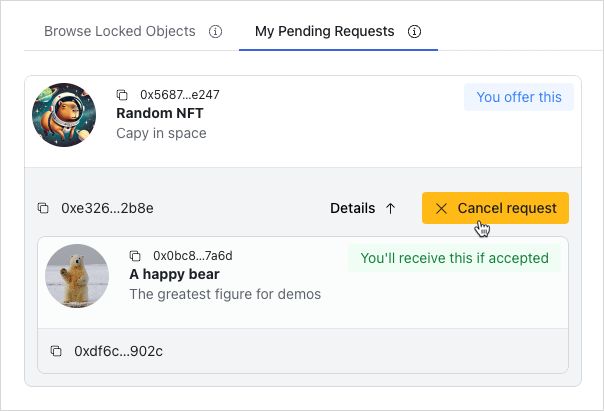
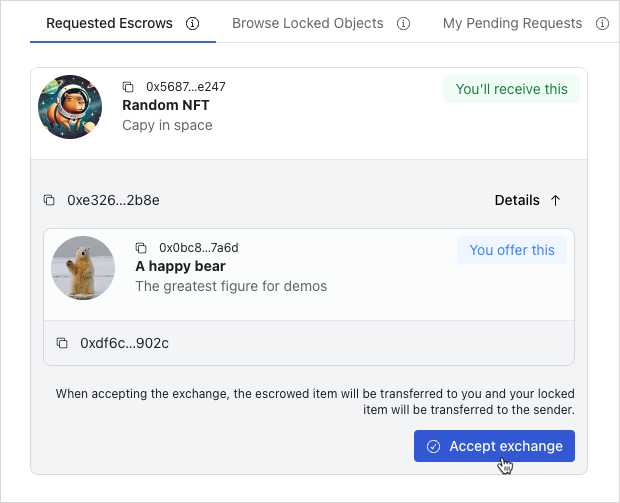
Finished frontend
At this point, you have a fully functional frontend that allows users to discover trades and interact with listed escrows. The UI is designed to be user-friendly and intuitive, allowing users to easily navigate and interact with the application.